Cardflow 3D View Camera Settings
In addition to allowing the cards to be positioned in a 3-dimensional universe, the Cardflow™ 3D View also exposes various settings that allow its camera to be moved and positioned along the X, Y, and Z axes to provide any desired depth perception and view angle.
Camera Positioning The CameraXOffset, CameraYOffset, and CameraZOffset properties determine the offset of the camera, in card widths, from the middle of the center card on their corresponding axis (see Figure 1).

Figure 1: Camera movement along the X, Y, and Z axes
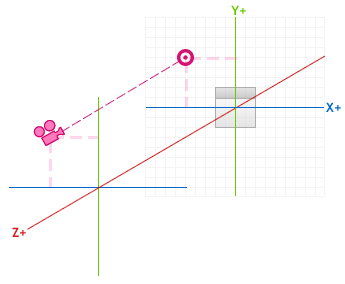
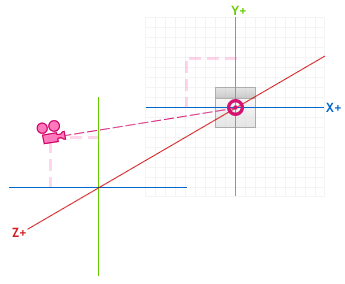
When the camera moves along the X and Y axes, it can either continuously look at the corresponding X or Y origins or straight ahead according to the values of the CameraLooksAtOriginOnX and CameraLooksAtOriginOnY properties. For example, if the camera were to move in a negative direction (left) along the X axis and in a positive direction (up) along the Y axis with both the CameraLooksAtOriginOnX and CameraLooksAtOriginOnY properties set to false, it would look straight ahead without looking at the cards, which would then be visible only on the lower right (see Figure 2). With the camera in the same position but looking at both the X and Y origins, the result would be that the center card would always remain visible and in the center of the viewport (see Figure 3).
 |  |
|---|---|
| Figure 2: CameraLooksAtOriginOnX and CameraLooksAtOriginOnY set to false | Figure 5: CameraLooksAtOriginOnX set to true; CameraLooksAtOriginOnY set to false |
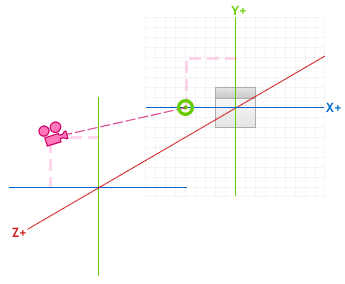 | 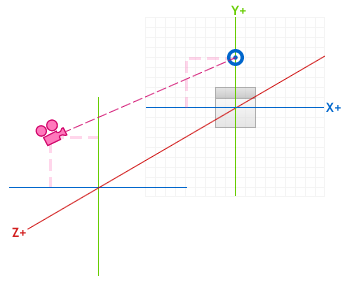 |
| Figure 4: CameraLooksAtOriginOnY set to true; CameraLooksAtOriginOnX set to false | Figure 5: CameraLooksAtOriginOnX set to true; CameraLooksAtOriginOnY set to false |
The CameraRevolutionXAngle and CameraRevolutionYAngle properties determine the angle of the camera as it revolves on the X or Y axis, respectively (see Figure 5).
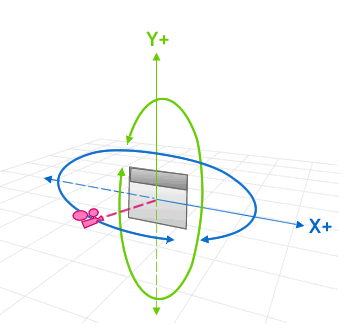
Figure 5: Camera revolution angle on the X axis
The CameraLooksAtCenterOnX and CameraLooksAtCenterOnY properties do not influence the direction the camera looks when it revolves on the X or Y axis, nor will modifications made to the CameraRevolutionXAngle and CameraRevolutionYAngle properties affect the direction the camera looks.
In addition to positioning the camera along any of the 3 axes and modifying its look direction, it is also possible to change the camera's field of view through the FieldOfView property. By default, the field of view is set to a 45 degree angle; however, it can be increased or decreased to change the angular extent of the cards.