Cell Error Styles
By default, when the value of a cell fails the validation process, its appearance will change to provide a visual cue that an error has occurred (see Figure 1). To redefine the appearance of a cell when its value is in error, the CellErrorStyle property can be set to a new style, which will be used when a validation error occurs. The error style can be provided at the grid, row, column, or cell levels by setting their respective CellErrorStyle properties (see Example 1).
When defining a style to use when a cell is in error, a key must be provided otherwise the style will be applied to all objects of the style's specified target type.
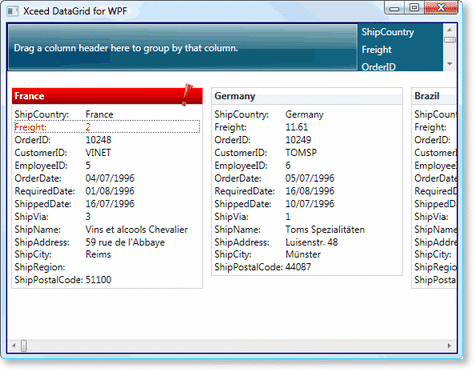
Figure 1: Cell error style in card-view layout
The IsValidationErrorRestrictive property indicates whether the validation error that failed prevents the focus from moving to another row until the error is fixed. Usually, all errors are restrictive; however validation errors reported through IDataErrorInfo are considered non-restrictive. By default, when a non-restrictive error occurs an orange-toned error style will be used.
Examples
All examples in this topic assume that the grid is bound to the Orders table of the Northwind database, unless stated otherwise.
Example 1: Providing a cell error style
The following example demonstrates how to provide a new style that will change the foreground color of a cell when its value fails the validation process.
<Grid xmlns:xcdg="http://schemas.xceed.com/wpf/xaml/datagrid"
     xmlns:local="clr-namespace:Xceed.Wpf.Documentation">
  <Grid.Resources>
     <xcdg:DataGridCollectionViewSource x:Key="cvs_composers"
                                        Source="{Binding Source={x:Static Application.Current},
                                                         Path=Composers}"/>
     <Style x:Key="cell_error" TargetType="{x:Type xcdg:DataCell}">
          <Setter Property="Foreground" Value="Red"/>
       </Style>
  </Grid.Resources>
  <xcdg:DataGridControl ItemsSource="{Binding Source={StaticResource cvs_composers}}"
                                            CellErrorStyle="{StaticResource cell_error}">
     <xcdg:DataGridControl.Columns>
       <xcdg:Column FieldName="Period"
                    CellEditor="{StaticResource periodEditor}">
          <xcdg:Column.CellValidationRules>
             <local:PeriodVSCompositionCountCellValidationRule/>
          </xcdg:Column.CellValidationRules>
       </xcdg:Column>
       <xcdg:Column FieldName="CompositionCount">
          <xcdg:Column.CellValidationRules>
             <local:PeriodVSCompositionCountCellValidationRule />
          </xcdg:Column.CellValidationRules>
       </xcdg:Column>
     </xcdg:DataGridControl.Columns>
  </xcdg:DataGridControl>
</Grid>