Inserting Data
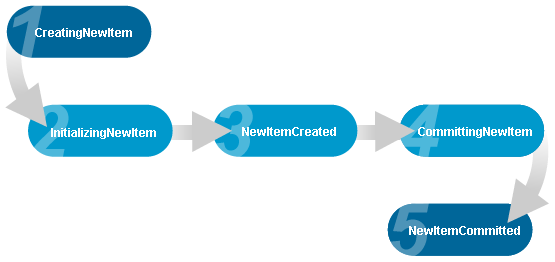
The DataGridCollectionView and DataGridCollectionViewSource classes expose events (see Table 1) that are triggered during key stages of inserting a new item into an underlying data source. These events provide full control over the insertion process and make it possible to insert items into a source that does not implement the IBindingList interface.
Table 1: Insertion events
| Event | Description |
|---|---|
| CreatingNewItem | Raised when the AddNew method has been called to signal that a new item is about to be created. |
| InitializingNewItem | Raised after the CreatingNewItem event to allow the new item to be initialized. |
| NewItemCreated | Raised after the CreatingNewItem and InitializingNewItem events to signal that a new item has been created. |
| CommittingNewItem | Raised when the CommitNew method has been called to signal that a new item is about to be committed to the underlying data source. |
| NewItemCommitted | Raised after the CommittingNewItem event to signal that a new item has been committed to the underlying data source. |
| CancelingNewItem | Raised when the CancelNew method has been called to signal that the insertion process of a new item is about to be canceled. |
| NewItemCanceled | Raised after the CancelingNewItem event to signal that the insertion process of a new item has been canceled. |
The CreatingNewItem and InitializingNewItem events are raised sequentially by the AddNew method to signal that a new item is about to be created and may need to be initialized. In the CreatingNewItem event, if the insertion of new items is to be handled manually, a new item must be provided and the Handled property set to true to indicate that the process will be handled manually. If a new item is provided but the Handled property was not set or was set to false, the item will be ignored and an attempt will be made by the DataGridCollectionView to create a new item.
If a new item is provided in the CreatingNewItem event, its values can be initialized either there or in the InitializingNewItem event. If the item was automatically created by the DataGridCollectionView, its values can only be initialized in the InitializingNewItem event.
An InvalidOperationException will be thrown if the Handled property is set to true but a new item is not provided.
Once the item has been created and initialized, the NewItemCreated event will be raised to signal that the new item has been created. If the creation of the new item is canceled (e.g., the ESC key is pressed or CancelNew is called), the CancelingNewItem event will be raised followed by the NewItemCanceled event.
When manually handling the item-insertion process, the ComittingNewItem will be raised by the CommitNew method to signal that the new item is about to be committed to the underlying data source. In this event—not the CreatingNewItem event—the new item can be added to the underlying data source using custom-defined logic. Once the new item is successfully committed to the underlying data source, the Index and NewCount properties received as event parameters must be set to the required values. Regardless, the Handled property must be set to true to indicate that the process was handled (see Example 1).
Manually handling the insertion of new items requires that the CreatingNewItem, CommitingNewItem, and CancelingNewItem events must all be handled; otherwise, an InvalidOperationException will be throw
Master/Detail
In addition to the insertion events being raised by the master DataGridCollectionView, child details will also raise these events on the master collection view when new items are added to their underlying data source.
Inserting Data at Runtime
At runtime, new data items can be inserted into a grid through the use of an InsertionRow, which can be added to a header or footer section.
The mode used in an insertion row can be set using the InsertionMode property, which can have Default or Continuous as its value (default value is Default). When set to Continuous, pressing Enter moves the focuse to the first editable cell in a new row; this behavior also occurs when Tab is pressed on the last cell. When InsertionMode is set to Default, the focus remains at the current cell. In either case, leaving edit mode using the mouse or the arrow keys does not cause the focuse to move to the next editable cell.
Programmatically, rows can be inserted directly into the data source to which a grid is bound.
The content of the cells contained in an insertion row can be initialized through the use of a grid's InitializingInsertionRow event (see Example 2).
Examples
All examples in this topic assume that the grid is bound to the Orders table of the Northwind database or a collection of Person objects, unless stated otherwise.
Example 1: Manually handling the insertion process
The following example demonstrates how to manually handle the insertion process of a new item into a collection.
- XAML
- C#
- VB.NET
<Grid xmlns:xcdg="http://schemas.xceed.com/wpf/xaml/datagrid"
    xmlns:local="clr-namespace:Xceed.Wpf.Documentation">
  <Grid.Resources>
    <xcdg:DataGridCollectionViewSource x:Key="cvs_persons"
                                      Source="{Binding Source={x:Static Application.Current},
                                                        Path=PersonList}"
                                      CreatingNewItem="CollectionView_CreatingNewItem"
                                      CommittingNewItem="CollectionView_CommittingNewItem"
                                      CancelingNewItem="CollectionView_CancelingNewItem"/>
  </Grid.Resources>
  <xcdg:DataGridControl x:Name="PersonsGrid"
                        ItemsSource="{Binding Source={StaticResource cvs_persons}}">
    <xcdg:DataGridControl.View>
        <xcdg:TableView>
          <xcdg:TableView.FixedHeaders>
              <DataTemplate>
                <xcdg:InsertionRow/>
              </DataTemplate>
          </xcdg:TableView.FixedHeaders>
        </xcdg:TableView>
    </xcdg:DataGridControl.View>
  </xcdg:DataGridControl>
</Grid>
private void CollectionView_CreatingNewItem( object sender, DataGridCreatingNewItemEventArgs e )
{
  e.NewItem = new Person( Person.AutoIncrementID, string.Empty, string.Empty, -1 );
  e.Handled = true;
}
private void CollectionView_CommittingNewItem( object sender, DataGridCommittingNewItemEventArgs e )
{
  List<Person> source = e.CollectionView.SourceCollection as List<Person>;
  source.Add( ( Person )e.Item );
  Person.AutoIncrementID = Person.AutoIncrementID + 1;
  // the new item is always added at the end of the list.
  e.Index = source.Count - 1;
  e.NewCount = source.Count;
  e.Handled = true;
}
private void CollectionView_CancelingNewItem( object sender, DataGridItemHandledEventArgs e )
{
  // Manually handling the insertion of new items requires that the CreatingNewItem,
  // CommitingNewItem, and CancelingNewItem events must all be handled even if nothing
  // is done in the event.
  e.Handled = true;
}
Private Sub CollectionView_CreatingNewItem( ByVal sender As Object, _
                                            ByVal e As DataGridCreatingNewItemEventArgs )
  e.NewItem = New Person( Person.AutoIncrementID, String.Empty, String.Empty, -1 )
  e.Handled = True
End Sub
Private Sub CollectionView_CommittingNewItem( ByVal sender As Object, _
                                              ByVal e As DataGridCommittingNewItemEventArgs )
  Dim source As List( Of Person ) = CType( e.CollectionView.SourceCollection, List( Of Person ) )
  source.Add( CType( e.Item, Person ) )
  Person.AutoIncrementID = Person.AutoIncrementID + 1
  ' the new item is always added at the end of the list.
  e.Index = source.Count - 1
  e.NewCount = source.Count
  e.Handled = True
End Sub
Private Sub CollectionView_CancelingNewItem( ByVal sender As Object, _
                                            ByVal e As DataGridItemHandledEventArgs )
  ' Manually handling the insertion of new items requires that the CreatingNewItem,
  ' CommitingNewItem, and CancelingNewItem events must all be handled even if nothing
  ' is done in the event.
  e.Handled = True
End Sub
Example 2: Initializing an InsertionRow
The following example demonstrates how to initialize the values of the ShipCountry, ShipCity, and ShipVia columns in an insertion row located in the fixed headers. The handler for the InitializingInsertionRow event is defined in the code-behind class.
The columns that are contained in the grid will be limited to those specified in the ItemProperties of the DataGridCollectionViewSource.
- XAML
- C#
- VB.NET
<Grid xmlns:xcdg="http://schemas.xceed.com/wpf/xaml/datagrid">
  <Grid.Resources>
    <xcdg:DataGridCollectionViewSource x:Key="cvs_orders"
                                    Source="{Binding Source={x:Static Application.Current},
                                                        Path=Orders}"
                                    AutoCreateItemProperties="False">
      <xcdg:DataGridCollectionViewSource.ItemProperties>
        <xcdg:DataGridItemProperty Name="ShipCountry" Title="Country"/>
        <xcdg:DataGridItemProperty Name="ShipCity" Title="City"/>
        <xcdg:DataGridItemProperty Name="ShipVia" Title="Ship With"/>
      </xcdg:DataGridCollectionViewSource.ItemProperties>
    </xcdg:DataGridCollectionViewSource>
  </Grid.Resources>

  <xcdg:DataGridControl x:Name="OrdersGrid"
                        ItemsSource="{Binding Source={StaticResource cvs_orders}}"
                        InitializingInsertionRow="InitInsertion">
      <xcdg:DataGridControl.View>
        <xcdg:CardView>
          <xcdg:CardView.FixedHeaders>
              <DataTemplate>
                <xcdg:InsertionRow/>
              </DataTemplate>
          </xcdg:CardView.FixedHeaders>
        </xcdg:CardView>
      </xcdg:DataGridControl.View>
  </xcdg:DataGridControl>
</Grid>
private void InitInsertion( object sender, InitializingInsertionRowEventArgs e )
{
  e.InsertionRow.Cells[ "ShipCountry" ].Content =
        this.ParseCountry( System.Globalization.CultureInfo.CurrentCulture.DisplayName );
  e.InsertionRow.Cells[ "ShipCity" ].Content = "Enter City Here";
  e.InsertionRow.Cells[ "ShipVia" ].Content = "1";
}
private string ParseCountry( string name )
{
  int startIndex = name.IndexOf( "(" );
  return name.Substring( startIndex + 1, name.Length - startIndex - 2 );
}
  Private Sub InitInertion( ByVal sender As Object, ByVal e As InitializingInsertionRowEventArgs )
    e.InsertionRow.Cells( "ShipCountry" ).Content =
                Me.ParseCountry( System.Globalization.CultureInfo.CurrentCulture.DisplayName )
    e.InsertionRow.Cells( "ShipCity" ).Content = "Enter City Here"
    e.InsertionRow.Cells( "ShipVia" ).Content = 1
  End Sub
  Private Function ParseCountry( ByVal name As String ) As String
    Dim startIndex As Integer = name.IndexOf( "(" )
    Return name.SubString( startIndex + 1, name.Length - startIndex - 2 )
  End Function