System Themes
The system themes are pixel-perfect themes that were designed to integrate into any windows application, regardless of the theme being used.
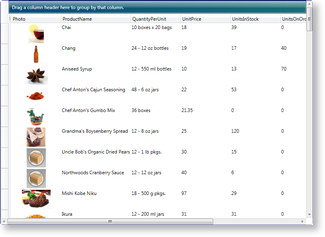
Figure 1: Table view in Aero system theme
Themes can be set using attribute syntax or property element syntax through a view's Theme property (see Examples 1 and 2 in Views and Themes Overview). If a theme is not specified, the system-color theme will be used. In either case, if the system-color theme is not recognized (e.g., a third-party color palette is being used), the Aero normal-color theme will be used.
To change the view and theme using attribute syntax or property element syntax, the name of the view and (optionally) theme to use must be set (see Table 1).
Table 1: System-theme syntaxes
| Theme | color palette | Attribute syntax | Property element syntax | Target views |
|---|---|---|---|---|
| Aero | Normal | [View.]Aero.NormalColor [View.]AeroNormalColorTheme | AeroNormalColorTheme | TableflowView and TableView |
| Luna | Normal | [View.]Luna.NormalColor [View.]LunaNormalColorTheme | LunaNormalColorTheme | TableflowView and TableView |
| Luna | Metallic | [View.]Luna.Metallic [View.]LunaMetallicTheme | LunaMetallicTheme | TableflowView and TableView |
| Luna | Homestead | [View.]Luna.Homestead [View.]LunaHomesteadTheme | LunaHomesteadTheme | TableflowView and TableView |
| Royale | Normal | [View.]Royale.NormalColor [View.]RoyaleNormalColorTheme | RoyaleNormalColorTheme | TableflowView and TableView |
| Classic | System | [View.]Classic.SystemColor [View.]ClassicSystemColorTheme | ClassicSystemColorTheme | TableflowView and TableView |
| Zune | Normal | [View.]Zune.NormalColor [View.]ZuneNormalColorTheme | ZuneNormalColorTheme | TableflowView and TableView |
| Windows7Theme | Normal | [View.]Windows7 [View.]Windows7Theme | Windows7Theme | TableflowView and TableView |
| Windows8Theme | Normal | [View.]Windows8 [View.]Windows8Theme | Windows8Theme | TableflowView and TableView |